How to register a domain for your website
How to choose the name, check that it is available and register it through a registrar, keeping yourself as the registrant. With the things to keep safe: the AuthInfo code, your contact details and the renewal.
Procedure verified on against the official sources.
A domain (for example yourname.it) is registered through a registrar, an accredited company that deals with the Registry on your behalf. First you check that the name is available, then you register it in your own name, not in the name of whoever builds your website. Finally you keep the AuthInfo code safe and keep an eye on the yearly renewal.
Before you start
Three words to know:
- Registry: the register of all the domains with a given extension. For
.itdomains it is the Registro .it (nic.it), the .it Registry. - Registrar: the company you go to in order to register the domain. The Registro .it explains that it doesn't register new names directly for users: registrars do.
- Registrant (or holder): the person or company the domain belongs to. It must be you.
For a .it domain, the Registry lists these requirements: being of legal age and having citizenship, residence or registered office in a country of the European Economic Area, in Vatican City State, in San Marino, in Switzerland or in the United Kingdom.
Keep at hand:
- your correct personal details (or your company's);
- an email address you actually read, because renewal reminders and confirmation requests will arrive there;
- an idea for the name, with two or three alternatives.
Step 1: choose the name
The Registro .it sets these rules for the name:
- from 3 to 63 characters;
- letters, the numbers 0 to 9 and the hyphen
-; - the hyphen can't be at the beginning or at the end;
- the first four characters can't be
xn--.
Some .it names are reserved: those matching Italian regions, provinces and municipalities are set aside for local authorities.
Practical tips: choose a short name, easy to spell out over the phone, without ambiguous double letters. Avoid hyphens if you can: spoken aloud, they are easy to get wrong.
Step 2: check that it is available
- Go to the Registro .it website (nic.it).
- Use the WHOIS service: type the full name with the extension, for example
yourname.it. - If the name is already registered, try an alternative.
Registrars also show availability on their websites, but the Registry's WHOIS is the official source for .it.
Step 3: choose the registrar
The Registro .it states that to register the domain you have to go to a registrar. For extensions such as .com, registrars are accredited by ICANN, the body that coordinates domain names worldwide.
Before choosing, read the contract. ICANN points out that you have the right to know who the registrar is, its terms, its fees and how to contact support, and to download the registration agreement. Look in particular at:
- how much the renewal costs (not just the first year);
- whether renewal is automatic and how to turn it off;
- how you get the AuthInfo code if one day you want to switch registrar.
Step 4: register the domain in your own name
This is the most important point of the whole guide.
In the registration form, the registrant must be your name or your business's name, with your correct details. Not those of the web designer, the agency or the hosting provider.
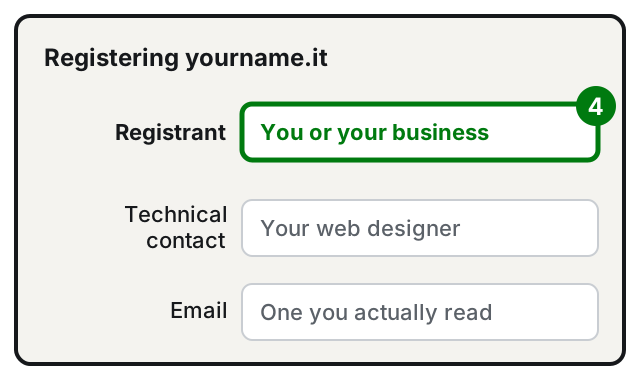
ICANN says it clearly: letting third parties, such as whoever hosts or develops your website, be listed as the registrant of your domains is not good practice. Whoever helps you can appear as the technical or administrative contact, but the registrant should remain you.
Why it matters:
- if the provider closes down, disappears or you fall out with them, the domain legally belongs to them;
- to get it back, you might have to prove with payment receipts that it was yours.
If someone registers the domain for you, ask to see the domain record and check the registrant's name.
Step 5: keep the AuthInfo code
For .it domains, at registration the registrar gives you the AuthInfo code, a sort of password for the domain. The Registry explains that it is needed for important operations: changing the registrant or transferring the domain to another registrar.
- Save it somewhere safe, together with the login details for the registrar's control panel.
- If you lose it, ask your registrar for it. The Registry steps in only if the registrar can't be reached or refuses to provide it.
ICANN recommends always keeping the domain management credentials yourself, even when you entrust the management to someone else.
Step 6: keep your details up to date and remember the renewal
- A
.itdomain lasts one year from registration (or from the last change). According to the Registry, the service renews every year unless cancelled: check your registrar's terms. - If you don't renew, the registrar deactivates the service and the domain, after a recovery period, is deleted and becomes available to others.
- ICANN asks registrants to keep their contact details up to date and to reply to the registrar's requests: if the email address is old, you won't receive the reminders.
If your website also uses email on the domain, see how to set up your domain email on iPhone and Outlook. And to be found on maps, create your business's Google profile.
If it still doesn't work
- The name you want is taken: try a variant (with your city, with your type of business) or another extension.
- The registrar won't give you the AuthInfo: ask for it in writing. For
.it, if the registrar can't be reached or refuses, you can turn to the Registro .it. - The domain is registered to someone else: gather your proof of payment and request a change of registrant through the registrar.
- The domain has expired: contact the registrar right away. The Registry states that reactivation must be requested from the registrar, usually within a few days of expiry.
- You don't know who your registrar is: look up the domain in WHOIS; the registrar is usually shown in the record.
- You need a hand working out who the registrant is, recovering a domain or connecting it to your website: a technician can check the situation together with you, without you having to hand ownership of the domain to anyone.
Frequently asked questions
Can I register a domain directly on the Registro .it website?
No. The Registro .it keeps the list of domains but doesn't register them on people's behalf: you have to go through a registrar, that is, an accredited company.
Is the domain mine forever?
No, you keep it as long as you renew it. A .it domain lasts one year and is renewed; if you don't renew it, it is first suspended and then becomes available to anyone.
The person who built my website registered the domain in their own name: what do I do?
Ask them to transfer it to you as the registrant. For a .it domain you need the AuthInfo code; keep your payment receipts, because they can help prove the domain is yours.
Can I switch registrar without losing the domain?
Yes. For a .it domain the AuthInfo code is enough: you ask your current registrar for it and give it to the new one.
Sources
- How to register (Registro .it)
- FAQ (Registro .it)
- Domains and more: 7 things to know when registering a domain (Registro .it) (in Italian)
- Domain Name Registrants' Benefits and Responsibilities, ICANN
- Good Practices for the Registration and Administration of Domain Name Portfolios, ICANN
- Information for Domain Name Registrants, ICANN