How to spot a scam email or text message (phishing)
The signs that give away a scam message, what to check before you click, what to do if you've already entered data or codes and where to report it, according to the Italian Postal Police, the Italian data protection authority, CSIRT Italia and the Bank of Italy.
Procedure verified on against the official sources.
A scam message usually rushes you, scares you or promises something and asks you to click a link or give out data and codes. The safest rule: never use the links or phone numbers you find in the message. If in doubt, open the official website or app yourself, or call the number you already know.
It's called phishing when it comes by email, smishing when it comes by text or chat, vishing when it's a phone call. The trick is the same.
Before you start: the golden rule
Banks, public agencies, companies and big stores don't ask you for personal data, passwords or codes by email, text, social media or chat. Both the Garante privacy (Italy's data protection authority) and the Polizia Postale (the Italian police unit for online crime) remind you of this. The Bank of Italy puts it even more firmly: your bank will never ask you, by email or by phone, for the data you use for online payments or online banking.
If a message asks you for exactly that, it's almost certainly a scam, even if the logo is perfect.
The signs that should make you suspicious
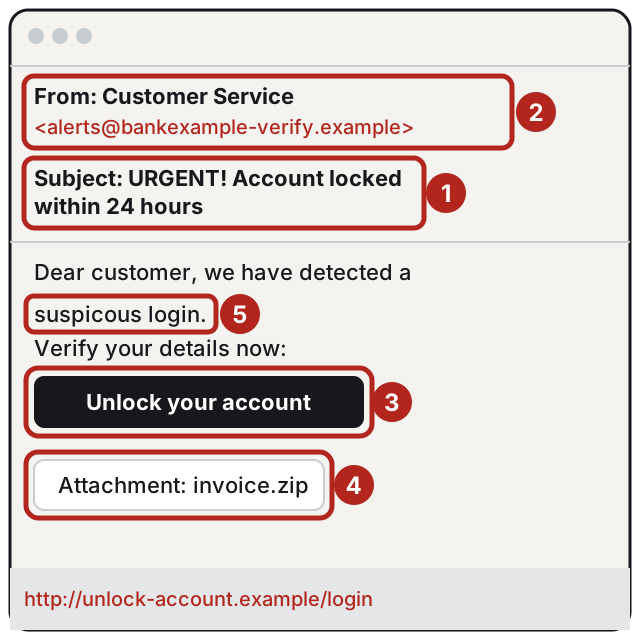
- Pressure and threats. "Your account will be blocked", "you have a fine to pay by today", "suspicious sign-in to your account". The Garante points to exactly these final, intimidating tones, which are meant to make you act without thinking.
- The sender doesn't add up. Look at the full email address, not just the name shown. It's often an imitation of the real one, with extra letters or a different domain. CSIRT Italia (Italy's national cybersecurity incident response team) advises checking that the sender's domain really matches the service it claims to be.
- The link goes somewhere else. On a computer, rest the mouse pointer on the link without clicking: the real address appears at the bottom left of the browser. If it isn't the official website you know, don't click. Be wary of shortened addresses too.
- Unexpected attachments. Invoices, shipping notices or "documents to sign" that you weren't expecting may contain harmful programs. Don't open them.
- Spelling and grammar mistakes. Badly translated sentences, wrong accents, odd layout. Not always there, but when they are, it's a good clue.
- Offers too good to be true, bills or parcels to release. Amazing discounts, tax refunds, parcels held at customs, unpaid installments: these are the most common pretexts.
- A phone call asking for codes or bank transfers. A fake bank employee may tell you there's a suspicious transaction and ask you to move your money "to a safe account" or to read them a code. The Polizia Postale recommends being wary of these requests.
How to check a suspicious message
- Don't reply and don't click.
- Open the official website or app yourself, typing the address by hand or using the app you already have on your phone. If there really is a problem, you'll see it there.
- Call the official number you find on the back of your card, on your contract or on the website, not the one written in the message. You can also go to your branch in person.
- Look at the name of the website before typing any data. The padlock next to the address guarantees nothing on its own: scam websites can have it too.
If you've already clicked or given out your data
Don't waste time and don't be embarrassed: it happens to lots of careful people.
- Call your bank right away, or whoever issued your card, on the official number, and ask them to block cards and access. The Bank of Italy says to notify your bank immediately.
- Change the password of the account involved and of every account where you used the same one. Then turn on two-step verification, which stops many account thefts even when the password has been stolen.
- Check your account transactions and turn on automatic alerts for every transaction, as the Garante advises.
- File a report with the Polizia Postale, at their offices or through the channels shown on the website commissariatodips.it (in Italian). Keep screenshots of the message.
- Ask your bank for a refund for the transactions you didn't make. The Bank of Italy explains that the bank must reply to a complaint about payment services within 15 working days, and it also lists the next steps, such as the Banking and Financial Ombudsman (ABF).
- If you opened an attachment or installed something, disconnect the device from the internet and have it checked.
How to report a scam message
- Polizia Postale: on the website commissariatodips.it (in Italian) you can report phishing cases.
- Your mailbox: mark the message as spam or phishing, so the filter learns. The Garante advises checking that the spam filters in your email program are turned on.
If it still doesn't work
- You get lots of scam texts: don't reply, don't call back the numbers given and delete them. If you want to contact the company, call its official switchboard, as the Garante advises.
- The messages use your first and last name: it means your data is already circulating somewhere. Be even more careful and protect your main accounts with two-step verification.
- The computer started acting strangely after an attachment (windows opening by themselves, unknown programs): don't use it for banking until it has been checked.
- You've lost access to your email: first of all, recover it through the service's official procedure, because all your other accounts can be reset from there.
- If you suspect someone has got into your computer or your accounts, a technician can check the device, secure your passwords and make sure your backups are intact.
Frequently asked questions
Does the padlock in the address bar mean the website is safe?
No, not on its own. The padlock says the connection is protected, not that it's really your bank on the other end: always look at the name of the website.
The message arrives in the same thread as the real texts from my bank: is it genuine?
Not necessarily. The Polizia Postale warns that scammers can make numbers appear identical to the official ones. Call your bank yourself on the number you know.
I only opened the message, without clicking: what should I do?
Delete it and, if you like, report it. The dangers the Garante and the Polizia Postale point out are clicking links, opening attachments and giving out data or codes: if you've done none of these, there's nothing else to do.
Can my bank ask me for the code I get by text message?
No. The Bank of Italy and the Polizia Postale are clear: your bank never asks you by email, text or phone for the data and codes you use for online banking and payments.
Sources
- Online fraud: phishing, smishing, vishing (Polizia Postale, in Italian)
- Phishing, beware of personal data fishermen, infographic (Garante privacy, in Italian)
- Smishing, the Garante's tips (Garante privacy, in Italian)
- Phishing campaign about account verification (CSIRT Italia, ACN, in Italian)
- What to do if you have been scammed or are the victim of fraud (Bank of Italy)