How to open a ZIP or RAR file on PC, Mac and phone
ZIP files open with the tools already built into Windows, Mac, iPhone and Android. For RAR files an up-to-date Windows 11 is enough, or 7-Zip, which is free and open source. Here are the steps for each system.
Procedure verified on against the official sources.
A ZIP file is a "package" that holds one or more compressed files. You can open it without installing anything: on Windows with Extract All, on Mac with a double-click, on iPhone with the Files app and on Android with Files by Google. For RAR files, File Explorer is enough on an up-to-date Windows 11; otherwise use 7-Zip, which is free and open source.
Before you start
- Only open archives you were expecting. A ZIP or RAR attachment from a stranger is one of the most common tricks to get you to open a virus. If in doubt, first read how to spot a phishing email.
- Check your free space. Extracted files take up more space than the package. Apple lists this as the first thing to check if a ZIP won't open. If you are short on space, see how to free up disk space in Windows.
- Don't use sites that "open RAR files online". To work, they need to receive your archive: if it contains personal documents, you are handing them to a service you don't know. The tools in this guide work on your own device.
- Download programs only from the official website, never from download sites full of "Download" buttons.
On Windows 11 and 10
Opening a ZIP file
Microsoft calls ZIP files "zipped folders". You use them almost like normal folders.
-
Find the ZIP file in File Explorer (it is usually in the Downloads folder).
-
To extract everything, right-click the file (or press and hold it, if you have a touch screen), choose Extract All..., then follow the instructions.
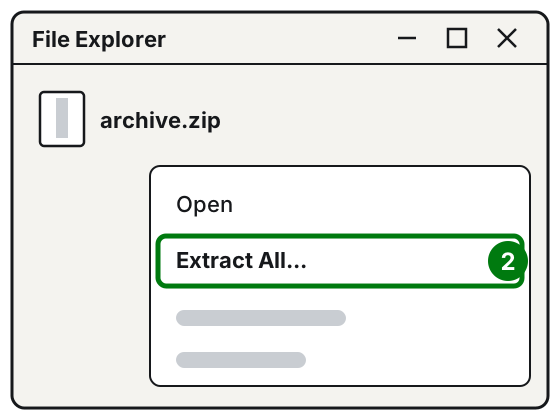
Step 2: right-click the ZIP file, Extract All. Illustration: SimpleBuild -
To extract a single file, double-click the ZIP file to open it and drag the file you need to another folder, for example the Desktop.
Opening a RAR file on Windows 11
Microsoft states that Windows 11, version 24H2, also supports the RAR, 7z and TAR formats. On an up-to-date PC, then, you can try the same steps as for ZIP. Microsoft points out, however, that Windows 11 does not support encrypted archives (protected by a password), and for those it suggests a program such as 7-Zip.
With 7-Zip (Windows 10, password-protected archives, or if the RAR won't open)
7-Zip is a free and open source program (GNU LGPL license, with an unRAR license restriction for the part that reads RAR files), for Windows 11 and 10. Among the formats it can extract are ZIP, 7z and RAR. Its interface is also available in Italian.
- Go to the official page 7-zip.org/download.html.
- Download the 64-bit x64 version (the right one for almost all recent PCs) and install it.
- Open 7-Zip File Manager from the Start menu.
- In the window, go to the folder where the archive is and select it.
- Press the Extract button, check the folder shown in Extract to: and confirm.
- If the archive is protected, 7-Zip asks you to enter the password.
After installation, 7-Zip also adds its own submenu when you right-click files, with options such as Extract files..., Extract Here and Extract to.
On Mac
Opening a ZIP file
- In the Finder or on the desktop, double-click the .zip file.
- The contents appear in the same folder as the .zip file. Then, if you want, you can delete the .zip file.
If it won't open, Apple suggests checking the free space on your Mac and, if someone sent you the file, asking them to compress it and send it again: it may have been damaged.
What about RAR files?
Apple's guide only covers ZIP files. The simplest solution is to ask whoever sent you the RAR to send it again as a ZIP. 7-Zip also exists for Mac, but only as a command-line version, to be used in Terminal: it suits people who are already comfortable with it. The official instructions file gives this command, to run in the program's folder, to extract an archive into the folder you are in:
./7zz x archive.rarOn iPhone and iPad
- Open the Files app and find the ZIP archive (for example in Downloads).
- Tap the ZIP file. A folder is created with the files inside.
- To rename the folder, touch and hold it, then tap Rename.
Apple documents how to open ZIP archives; for a RAR the safest way is to have it sent again as a ZIP.
On Android
Here you need the Files by Google app. Google points out that the app extracts only .zip files.
- Open Files by Google.
- Go to the folder that contains the .zip file (often Download).
- Select the .zip file: a pop-up appears showing its contents.
- Tap Extract.
- You see a preview of the extracted files. If you want to delete the ZIP after extraction, select the Delete ZIP file checkbox.
The extracted files end up in the same folder as the .zip file. Here too, for a RAR it is best to ask for it to be sent as a ZIP.
If it still doesn't work
- "The file is damaged" or the archive won't open: often the download was interrupted. Download it again, or ask the sender to send it again.
- It asks for a password you don't have: don't look for programs that promise to "crack" it. Ask whoever created the archive.
- There is a .p7m file inside the ZIP: it is a digitally signed document, see how to open a P7M file.
- You want to do the opposite, that is protect some files yourself before sending them: see how to protect a folder or a file with a password.
- A PDF is too heavy and you wanted to compress it: Microsoft warns that zipping files that are already compressed, such as JPEG photos, saves almost nothing. Better to follow how to reduce the size of a PDF.
- If you often receive archives from clients or suppliers and lose time extracting and sorting them, a technician can set up a small automation that does it for you.
Frequently asked questions
Can a ZIP file contain a virus?
Yes: the archive itself is only a container, but anything can be inside. Only open archives you were expecting, from people or sites you know, and be wary of unexpected compressed attachments.
The archive asks me for a password: where do I find it?
The password is chosen by whoever created the archive: ask the person who sent it. Microsoft notes that Windows 11 does not handle encrypted archives and suggests a program such as 7-Zip.
Can I delete the ZIP file after opening it?
Yes, once you have checked that all the extracted files are there. Apple and Google say so explicitly: the extracted files stay in the folder.
What is the difference between ZIP and RAR?
They are two different compressed archive formats, that is a single file that holds other files in a lighter form. ZIP opens everywhere with the built-in tools; RAR is less common and sometimes needs an extra program.