How to access the Fascicolo sanitario elettronico (Italy's electronic health record)
The Fascicolo sanitario elettronico holds your medical reports, prescriptions and exemptions. You get in from your Region's website with SPID, CIE or your health card: here is how to get there from the national portal, what you need and what to do if access is denied.
Procedure verified on against the official sources.
You access the Fascicolo sanitario elettronico (FSE, Italy's electronic health record) from your Region's website. The easiest way is to start from the national portal fascicolosanitario.gov.it, choose your Region on the map or in the list, and sign in with SPID (Italy's public digital identity), the Carta d'identità elettronica (CIE) (electronic ID card) or your tessera sanitaria (health card) used as a Carta nazionale dei servizi (CNS, national services smart card).
Each Region has its own portal and its own screens, which can change over time, and they are in Italian. Here you'll find the steps common to all of them and, as an example, the case of Apulia (Puglia).
What it is and what you'll find
The record is the single place where you find the digital health data and documents about you: produced by the Servizio sanitario nazionale (Italy's national health service) and, since May 19, 2020, by private facilities too. The information is managed by your Region or autonomous Province. There is only one record, and it also includes care received in other Regions.
According to the national portal, it can contain, for example:
- administrative data, such as exemptions from charges based on income or medical condition;
- lab, radiology and specialist visit reports;
- emergency room reports and hospital discharge letters;
- prescriptions for medicines, visits and tests;
- vaccinations and your vaccination status certificate;
- invitation letters for screenings and vaccinations.
In some Regions, such as Apulia, the same portal also offers other services, like booking appointments, paying the ticket (the patient's share of the cost) or changing doctor.
Before you start
- You must be registered with the Servizio sanitario nazionale (or with the healthcare service for seafarers).
- You need a digital identity: SPID, CIE or a tessera sanitaria with CNS function (in that case also a smart card reader and the card's PIN). If you don't have one yet, read how to get SPID or how to activate the CIE with the CieID app.
- Use your home computer or phone, not a public computer: it contains health data.
- Open the site by typing the address, or start from the national portal. Don't sign in from links received by SMS or email: read how to recognize a scam message.
How to sign in, in every Region
-
Open the national portal page Accedi al Fascicolo ("Access your record").
-
Select your Region or autonomous Province of care, on the map or in the list below it.
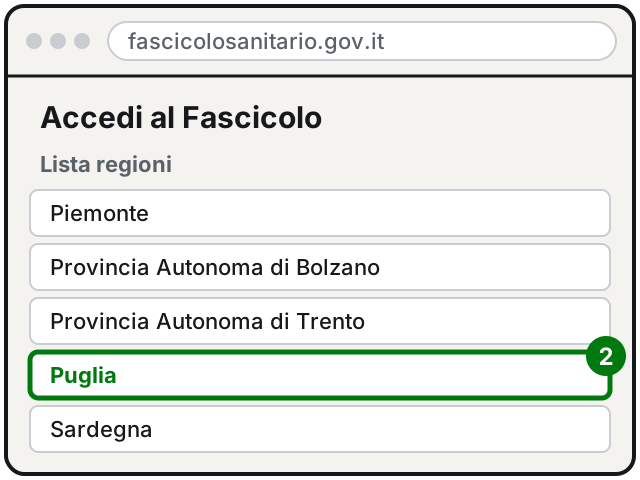
Step 2: choose your Region (here Apulia). Italian interface. Illustration: SimpleBuild -
Your Region's website opens: look for access to the Fascicolo and choose how to sign in.
-
Sign in with SPID, CIE or CNS, following the steps your method asks for (for example confirming in your SPID provider's app or in the CieID app).
If you need help with your data or documents, the national portal refers you to your Region's support service.
The Apulia example
In Apulia the Fascicolo is on the regional portal PugliaSalute, at sanita.puglia.it/fascicolo-sanitario-elettronico. The regional page says that:
- the Fascicolo services that require sign-in work with level 2 SPID, with the CIE or with a CNS smart card, including the tessera sanitaria with CNS function;
- from the same place you can, among other things, book visits and tests, pay the ticket, cancel a booking, view documents, choose or revoke your family doctor and see your vaccinations;
- some booking services only need your codice fiscale (Italian tax code) and health card number;
- at the end it is strongly recommended to close the browser, to end the session;
- for help with the Fascicolo services you write to the address given on the page, and in Apulia there are the Punti Digitale Facile (digital help points), where a facilitator helps you use these services for free.
If you live in another Region, the names and menus will be different: always start from the national portal.
Consent to consultation
The national portal explains that if you haven't given consent to consultation, nobody but you can see your record. Consent lets doctors and healthcare professionals see it to treat you, anywhere in Italy.
You can give or withdraw it at any time: online, from your record, or, depending on your Region's rules, at the desks of healthcare facilities or through your family doctor or pediatrician.
If it still doesn't work
- An error message appears and access is denied. If it isn't a connection, browser or SPID/CIE problem, the national portal recommends checking your healthcare registration with your ASL (local health authority).
- SPID doesn't work. If you forgot the password or changed phone, the problem has to be solved with your SPID provider. Meanwhile, if you have an active CIE, you can try signing in with that.
- You can't find a report. The national portal explains that healthcare facilities have had to update their systems to send every type of document to the record: if a report is missing, ask the facility that did the test or your Region's support.
- You want to download a report as a PDF and keep it. Save it in a folder on your computer and keep a backup copy: see the guide on the 3-2-1 backup rule.
- You're helping an elderly parent. The record is personal: you sign in with the digital identity of the person it belongs to. If your parent can't use SPID alone, get guidance from your Region's support or, in Apulia, from a Punto Digitale Facile. A trusted technician can help set up the phone, SPID and CIE, but the credentials always stay with their owner.
Frequently asked questions
Who can see the documents in my record?
If you haven't given consent to consultation, nobody but you. Consent lets the healthcare professionals treating you see your data, and you can give or withdraw it at any time.
If I move to another Region, do I lose my documents?
No. According to the national portal, once you choose your family doctor or pediatrician in the new Region, the documents from your previous record become available automatically.
Can I see my child's record?
First the parent must have their parental responsibility verified: online in their own record, on the national registry of patients (Anagrafe nazionale assistiti) portal, or in person at the ASL (local health authority). For when the service starts in your Region, ask the Region itself.
Does the record include visits made in another Region?
Yes, the national portal explains that the record is a single one and also includes documents for care received in other Regions or autonomous Provinces.
Sources
- Accedi al Fascicolo (Electronic health record, national portal, in Italian)
- Electronic health record national portal home (in Italian)
- How do I access my electronic health record? (national portal FAQ, in Italian)
- What documents can I find in my electronic health record? (national portal FAQ, in Italian)
- Error message and access denied (national portal FAQ, in Italian)
- Consent to consultation (national portal FAQ, in Italian)
- A minor child's record (national portal FAQ, in Italian)
- Changing Region of care (national portal FAQ, in Italian)
- Fascicolo Sanitario Elettronico (PugliaSalute, Apulia Region, in Italian)