How to block spam calls and unknown numbers
Three defenses against unwanted calls: free registration with Italy's Do Not Call register (Registro pubblico delle opposizioni), the filters already built into iPhone and Google's Phone app, and blocking individual numbers. No third-party apps needed.
Procedure verified on against the official sources.
Against unwanted calls, three defenses work together. The first is registering your number with the Registro pubblico delle opposizioni (Italy's public Do Not Call register): it's free and covers mobile phones too. The second is the filters already built into your phone: on iPhone you can silence numbers that aren't in your contacts, on Android Google's Phone app recognizes spam. The third is blocking individual numbers that keep calling. You don't need third-party apps.
Before you start
- Save important numbers in your contacts: doctor, pharmacy, school, family, your accountant. The filters only let through, without problems, people who are in your contacts.
- Keep in mind the difference between telemarketing (people offering you deals) and scams. The register stops telemarketing by companies that follow the rules. Scammers ignore the rules: against them you need your phone's filters and a healthy dose of suspicion.
- If a voice on the phone asks you for codes, passwords or to install something, hang up. The codes you get by text message are for you to sign in to your accounts (here's what two-step verification is for) and must never be told to anyone. The same goes for email: see how to recognize a phishing email.
Italy's Do Not Call register (RPO)
The Registro (RPO) is a free public service of the Ministry of Enterprises and Made in Italy, run by the Fondazione Ugo Bordoni. Since July 27, 2022 it accepts all Italian numbers, landline and mobile, including those not listed in phone directories.
What happens when you register:
- The telemarketing consents you gave before registering are canceled, including the ones you forgot about in online forms.
- The request is handled within one working day. Telemarketing companies then have at most 15 days to update their lists.
- It also covers automated calls with recorded messages and call centers calling from abroad on behalf of companies.
- It doesn't expire. You don't have to renew it every year.
How to register:
- Open the official site registrodelleopposizioni.it (there's an English version, «ENG» at the top) and go to the section For the citizen.
- Fill in the web form (Subscribe) with the number to register. Keep the Registry Code you're given: you need it to manage your registration from the site, and it's valid for 90 days.
- Alternatively you can register by phone or by email. For mobile phones the site gives the number 06 42986411, for landlines the toll-free number 800 957 766.
- From the next day you can check that the registration went through by calling the same number from the phone you registered, with caller ID visible (not anonymous), or from the site's «Manage subscription» page.
Even after registering, you can still be called by companies you have an active contract with, or one that ended less than 30 days ago (for example your phone carrier or your electricity and gas supplier), and those you give consent to after registering. You can ask these directly to stop calling you.
If you think a company isn't respecting your registration, note down the number, date and time of the call, the company name and the product offered. The Registro doesn't collect reports: they go to the Italian Data Protection Authority (Garante per la protezione dei dati personali), through its online form, or to the judicial authorities.
On iPhone
The settings below are those Apple describes for recent versions of iOS.
Silence or screen unknown callers
-
Open Settings and tap Apps, then Phone.
-
Scroll to Screen Unknown Callers and pick one of the three options:
- Never: calls from unsaved numbers ring like any other call.
- Ask Reason for Calling: before the phone rings, the caller is asked who they are and why they're calling.
- Silence: calls from unsaved numbers don't ring and go to voicemail.
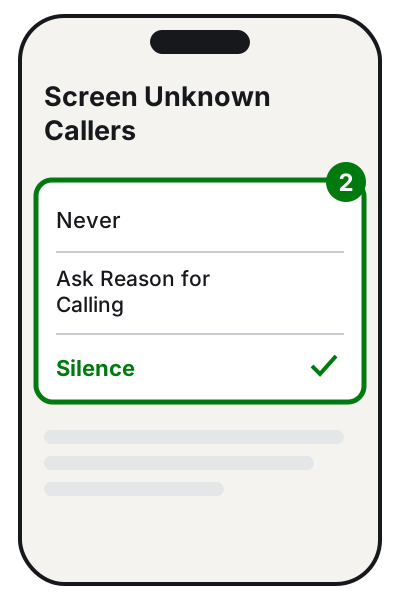
Step 2: pick one of the three options. Illustration: SimpleBuild -
Further down, under Call Filtering, you can turn on Unknown Callers: missed calls and voicemails from unknown numbers go to a separate list.
-
Also under Call Filtering you can turn on the spam filter, which sets aside unwanted calls.
To see the filtered calls, in the Phone app tap the Filter button, then Unknown Callers or Spam.
For FaceTime the setting is called Silence Unknown Callers: you'll find it in Settings > Apps > FaceTime.
Two things to know about the «Ask Reason for Calling» option, as Apple writes: if you're roaming it doesn't work, and if you call emergency services it turns off for 24 hours. Standard calling and data rates may also apply.
Block a specific number
- Open the Phone app and tap Recents.
- Tap the number to block (in Classic view, tap the Info button next to the number).
- Scroll down and tap Block Caller.
You no longer get calls, FaceTime calls or messages from the blocked number. They can still leave you a voicemail, but you don't get a notification, and they don't know they've been blocked.
To see or unblock blocked numbers, from iOS 26: Settings > Privacy & Security > Blocked Contacts. Tap Edit, then the delete button next to the number and Unblock.
On Android
The names below are those of Google's Phone app, found on Pixel phones and many other Android phones. On Samsung, Xiaomi and other brands the Phone app may be different and the items may have different names and places: in that case look for the same features in the Phone app's settings, or check the manufacturer's website.
Recognize and filter spam
The Caller ID and spam feature is on by default: when a possible nuisance caller rings, you see «Suspected spam caller» or «Spam». To check it:
- Open the Phone app.
- Tap More options (the three dots) > Settings > Caller ID and spam.
- Check that See caller ID & spam is on.
- If you want suspicious calls not to ring at all, turn on Filter spam calls. Filtered calls still stay in your call history.
Google warns that, for this to work, the phone may send Google the number of the person calling, if it's not in your contacts. Your contacts list isn't sent.
On phones with the automatic Call Screen feature, the «Filter spam calls» option isn't there: spam blocking is set from Call Screen.
Block a specific number
- Open the Phone app.
- Tap More > Call history.
- Tap a call from the number you want to block.
- Tap Block / report spam.
Block private numbers
- Open the Phone app and tap More.
- Tap Settings > Blocked numbers.
- Turn on Unknown.
Careful: this setting only blocks calls from private or unidentified numbers (the ones shown as «Unknown» or «Private»). Visible numbers that aren't in your contacts still ring.
To unblock a number, go back to Settings > Blocked numbers and tap Clear > Unblock next to the number.
If it still doesn't work
- Different numbers keep calling you: blocking them one by one doesn't help much. On iPhone choose Silence under «Screen Unknown Callers»; on Android turn on Filter spam calls.
- The filter blocked someone you know: on Android, from the call history, tap the call and then Not spam. On both systems, save the number in your contacts.
- You've been registered with the Registro for more than 15 days and advertising calls continue: maybe you gave new consents after registering. Use Renewal from the «Manage subscription» page; if you're sure you didn't give any, report it to the Garante privacy.
- The phone belongs to an elderly person who gets scared: the calmest choice is to save every number that matters in the contacts and silence the rest. Real callers leave a voicemail.
- If you'd like someone to set up the filters on your phone or a relative's, and explain what gets through and what doesn't, a technician can do it in a few minutes.
Frequently asked questions
Does registration with the Do Not Call register (RPO) expire?
No. According to the official site it's for an indefinite period. You only need the «Renewal» if, after registering, you gave consent to advertising calls again, for example by signing up to a website or a contest.
They still call me even though I'm registered: is that normal?
Companies you have an active contract with, or one that ended less than 30 days ago, can still call you, as can those you gave consent to after registering. If you suspect a violation, the Registro points you to the reporting form of the Italian Data Protection Authority (Garante privacy).
If I silence unknown numbers, will I miss calls from the doctor or the courier?
They may go to voicemail without the phone ringing. Save important numbers in your contacts: Apple recommends exactly that so you don't miss those calls.
Does the blocked person know they're blocked?
On iPhone, no: Apple explains that the contact gets no notification. Your phone simply doesn't alert you to their calls and messages.
Sources
- Italy's public Do Not Call register, RPO (official website, English version)
- Frequently asked questions for citizens (RPO, Do Not Call register)
- Manage unknown callers on iPhone (Apple Support)
- Block phone numbers, contacts, and emails on your iPhone or iPad (Apple Support)
- Use caller ID & spam protection (Phone app Help)
- Block or unblock a phone number (Phone app Help)