How to recover deleted WhatsApp chats
Deleted WhatsApp chats can only be recovered from a backup made before they were deleted, by reinstalling the app. Without a backup, they usually can't be recovered. How to check whether a backup exists, what you lose when restoring and why to distrust programs that promise miracles.
Procedure verified on against the official sources.
The honest answer: deleted WhatsApp chats can only be recovered if there's a backup made before you deleted them. In that case you uninstall and reinstall WhatsApp and, when asked, tap Restore. Without a backup, they usually can't be recovered: WhatsApp says that when you delete a message there's no way to get it back unless you included it in a backup, and that even its support team can't do it, because chats aren't stored on its servers.
First, though, check that the chat is really gone: often it's just archived.
Before you start
- Don't do anything hasty. Don't uninstall WhatsApp and don't start any backups until you've read this page.
- Stop new backups, if you can. Each backup replaces the previous one, and there's no way to go back to an older backup. If the next automatic backup runs tonight, it will save today's situation, that is without the deleted chat. To prevent that on Android, in WhatsApp tap More options > Settings > Chats > Chat backup > Back up to your Google Account and choose Never for now. On iPhone the frequency is under Settings > Chats > Chat backup > Auto backup. Remember to turn it back on afterwards.
- Accept what you'll lose. By restoring a backup you get your chats back as they were at the time of that backup. Anything you wrote and received after it can't be restored.
- You need the same phone number used for the backup, and on iPhone the same iCloud account.
Step 1: is the chat just archived?
Archiving a chat hides it from the list, but doesn't delete it.
On Android
- In the Chats tab, scroll to the top.
- Tap Archived.
- If you find it, tap and hold the chat and use the icon at the top to unarchive it.
On iPhone
-
At the top of the Chats screen, tap Archived.
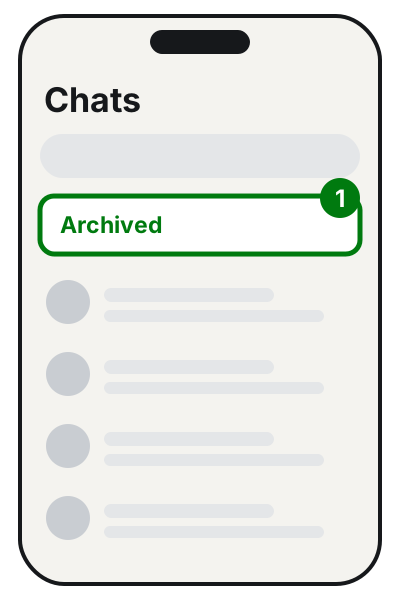
Step 1: Archived, at the top of the Chats tab. Illustration: SimpleBuild -
If you find it, swipe left on the chat.
-
Tap Unarchive.
On iPhone you can also type the contact's name in the search bar of the Chats tab: the archived chat shows up anyway.
Step 2: is there a backup?
On Android
- Open the Google One app and sign in to your Google account.
- Tap Storage > Other.
- If you have a WhatsApp backup, you'll see it listed there.
On iPhone
- In WhatsApp tap Settings.
- Tap Chats > Chat Backup.
- If there's a backup, you'll see the time and size of the last one.
Now look at the date of the last backup and compare it with when you deleted the chat:
- The backup is from before the deletion: the chat should be in it. Go to step 3.
- The backup is from after the deletion: the backup holds the situation at that moment, already without the chat. Restoring it won't bring the chat back.
- There's no backup at all: unfortunately the chat can't be recovered with WhatsApp's tools. See below for what you can still do.
Step 3: restoring the backup
Restoring is not done from settings: WhatsApp points out that there's no Restore option on the backup screen. It only appears during initial setup, after you reinstall the app.
On Android (Google backup)
- Uninstall WhatsApp.
- Reinstall it from the Play Store and sign in with the same number as the backup.
- When prompted, tap Restore.
- If WhatsApp asks you to verify your identity, confirm with the code you receive by text or call (or with the password of your encrypted backup, if you turned that on).
On iPhone (iCloud backup)
- Uninstall WhatsApp.
- Reinstall it from the App Store.
- Verify your phone number and sign in with the same iCloud account as the backup.
- Tap Restore Chat History.
Make sure you have enough space on the phone: if there isn't, WhatsApp may only restore part of the backup. Videos come back only if the backup included them.
If there's no backup
Let's be clear here: WhatsApp offers no way to recover deleted chats without a backup. What you can still do:
- Ask the person you were chatting with. If you used Delete for me, the message is gone only from your phone: the other person still sees it and can send you a screenshot or forward what you need.
- Look for photos and videos in your phone's gallery. Photos you received may have stayed saved outside WhatsApp too: WhatsApp itself warns, for example, that on iPhone received files may remain in the Photos app even after the message has been deleted. If the photos were on a memory card, there's a guide on how to recover deleted photos from an SD card.
- Don't count on your computer. If you also use WhatsApp on a PC, WhatsApp explains that deletions sync across all linked devices: the chat disappears there too.
Beware of "miracle" programs
Online you'll find programs and services that promise to recover "any deleted chat." WhatsApp doesn't recommend any of them, and explains that messages deleted without a backup can't be recovered. Many of these programs ask you to pay before showing any result, to connect your phone to a computer or to install apps that read everything on your phone: the real risk is losing money or handing strangers access to your data. If someone contacts you offering to "recover your chats," treat it as a scam attempt: the guide on how to recognize phishing emails helps you spot the signs.
So it doesn't happen again
Set up a daily automatic backup today: the guide on how to back up WhatsApp explains how, on Android and iPhone. Also remember that a Google backup not updated for 5 months might be deleted.
If it still doesn't work
- The restore gets stuck or shows an error. WhatsApp suggests switching Wi-Fi network or using mobile data, keeping the phone charging, updating the system and WhatsApp, and checking that you're using the same number and the same account (Google or iCloud) as the backup.
- The restore finishes but the chat isn't there. According to WhatsApp, the restored backup almost always didn't contain that chat, for example because it was made after the deletion.
- "Couldn't restore your chat history." If you've tried everything, the backup may be corrupted (for example because a backup was interrupted halfway). WhatsApp says it can't repair it.
- If the lost chats matter for work or legal reasons, get a technician by your side before you reinstall or restore: a step in the wrong order can overwrite the only backup you have. A serious technician will also tell you when nothing can be done.
Frequently asked questions
Can WhatsApp recover my chats if I ask support?
No. WhatsApp says it can't restore chats for you, because your chat history isn't stored on its servers.
Are there programs that recover chats without a backup?
WhatsApp doesn't name any and says deleted messages can't be recovered without a backup. Be wary of anyone who promises otherwise, especially if they ask for money up front or access to your phone.
I deleted a message with "Delete for me" a second ago: can I undo it?
Yes, but only for 5 seconds: tap **Undo** right away. After that, according to WhatsApp, the message can't be recovered.
If I restore the backup, do I lose my new messages?
Yes: anything you sent and received after the latest backup can't be restored. Weigh which loss matters more before you go ahead.
Sources
- How to delete messages (WhatsApp Help Center)
- How to restore your chat history, Android (WhatsApp Help Center)
- How to restore your chat history, iPhone (WhatsApp Help Center)
- Can't back up or restore your chat history, Android (WhatsApp Help Center)
- Can't back up or restore your chat history, iPhone (WhatsApp Help Center)
- How to archive or unarchive a chat or group, Android (WhatsApp Help Center)
- How to archive or unarchive a chat or group, iPhone (WhatsApp Help Center)
- About Google Account backups (WhatsApp Help Center)