How to use ChatGPT: first steps and what not to share
ChatGPT is an artificial intelligence program that answers questions in writing. How to get started, how to write clear requests, why every answer must be checked, what never to type into it, and how to stop your conversations being used to train the models.
Procedure verified on against the official sources.
ChatGPT is an artificial intelligence service from OpenAI: you type a question or a request and it answers with text. It is useful for summarizing, rewriting a letter, explaining a difficult word or getting ideas. You use it from the official website chatgpt.com or the official phone app.
Two rules before anything else: the answers can be wrong, so always check them; and never type information you wouldn't give a stranger, such as passwords, health data or other people's documents.
Before you start
- Age. OpenAI's terms for people living in Europe require at least 13 years (or the minimum age in your country). Anyone under 18 needs permission from a parent or guardian.
- Only use the official website or apps. Be wary of apps and websites that present themselves as ChatGPT but aren't from OpenAI. Download the app only from your phone's official store (App Store or Google Play), checking that the developer is OpenAI, and don't give money or data to anyone who promises to "activate" ChatGPT for you.
- Account or not. OpenAI lets you use ChatGPT without logging in, but some settings are only available once you log in. With an account, your privacy settings apply on all your devices. To create one you need real details: the terms require accurate information and forbid sharing your account with others.
- It is not a professional. OpenAI writes in its terms that the answers shouldn't be used as your only source of truth, nor as a substitute for professional advice.
First steps
- Open
chatgpt.comin your browser, or the ChatGPT app on your phone. - In the message box, type your request in plain words, in your own language.
- Press Enter (or the send button) and read the answer.
- If the answer isn't right, keep the conversation going: ask it to make it shorter, to explain it more simply, to give an example.
How to write a good request
The more precise you are, the better the answer. Say what you want, who it's for and in what form:
- Instead of "write a letter", try: "Write a polite letter to my building manager asking when the elevator will be repaired. Courteous tone, ten lines at most."
- Instead of "what is SPID?", try: "Explain what SPID is as if you were explaining it to my 75-year-old mother, in five sentences."
- For a text you have already written: "Correct the mistakes in this text without changing its meaning:" and then paste the text (after cleaning out personal data, see below).
Things it is handy for
- Summarizing a long text that you are allowed to share (an article, a public regulation).
- Rewriting a message more clearly or more politely.
- Explaining a technical term or a step in a manual.
- Finding ideas: a menu, an itinerary, a title.
- Preparing a draft for you to reread and correct.
The answers must be checked
This is the most important point. OpenAI itself, in its terms of use, warns that:
- answers may not be accurate and sometimes describe people, places or facts incorrectly;
- they shouldn't be used as your only source of information or in place of professional advice;
- before using or sharing them, you must evaluate them yourself;
- they shouldn't be used to make important decisions about a person, for example about health, employment, credit, housing or legal matters.
In practice: ChatGPT can state something false with great confidence, quote a law that doesn't exist or get a calculation wrong. For dates, deadlines, amounts, medicines, laws and paperwork, always check the official source (the agency's website, your doctor, your accountant, the medicine leaflet).
What not to share
What you type into ChatGPT is sent to OpenAI's servers. The terms say that OpenAI may use the content to provide and improve its services, and that it also uses human review to check that the rules are followed. So don't type:
- Passwords, PINs, verification codes, SPID codes (Italy's public digital identity) or card codes. No serious service needs you to type them into a chat.
- Health data: test results, diagnoses, treatments, yours or your family's. If you want to understand a medical term, ask in general terms, without names or documents.
- Identity documents, tax code, IBAN, card numbers, payslips, tax returns.
- Other people's documents or data: client contracts, friends' chats, photos of others, employee or patient data. They aren't yours to share, and the terms make you responsible for having the right to send what you type.
- Work secrets: if you use ChatGPT for work, first ask your employer whether it's allowed and under what rules.
A useful trick: before pasting a text, replace names, addresses and numbers with placeholders such as "[NAME]" or "[ADDRESS]". The answer will be just as useful.
Stop your chats being used for training
By default OpenAI may use your conversations to train its models. You can turn this off with the Improve the model for everyone option.
On the website (logged in)
- Open the account menu and select Settings.
- Select Data Controls.
- Select Improve the model for everyone, turn it off and select Done.
In the iPhone and Android app
- Open the sidebar.
- Tap the profile icon to open Settings.
- Tap Data Controls.
- Turn off Improve the model for everyone.
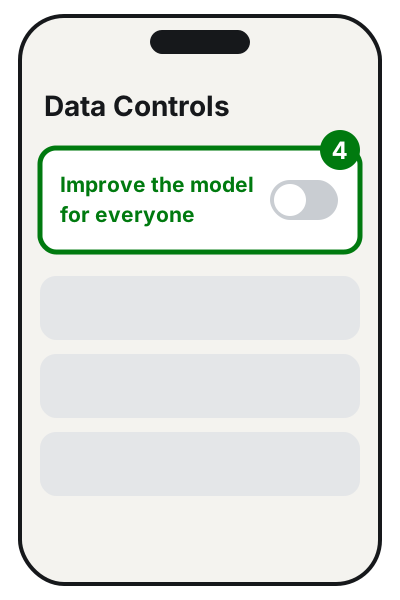
When you are logged in, the choice applies to your account on all devices. Without logging in, the choice is only saved in that browser. Careful: OpenAI points out that if you leave feedback (the thumbs up or down on an answer), the whole related conversation may be used for training even if you turned the option off.
Temporary chat
For a one-off question you can use a temporary chat. According to OpenAI these chats don't appear in your history, don't create memories and aren't used to improve the models, but they may be kept for up to 30 days for safety reasons. So it is not a place to type confidential data.
Delete chats or your account
Turning off training does not delete chats that are already saved. If you want to remove them, delete them one by one or delete your account from the settings: OpenAI warns that deleting your account is permanent.
If it still doesn't work
- The answers are vague or off topic. Rewrite the request adding context, who it's for and the length you want, or ask "Ask me three questions to better understand what I need".
- The answer contains an obvious mistake. Point it out in the conversation, but don't blindly trust the correction: check the source anyway.
- You get an email or text saying your ChatGPT account is about to be blocked and asking you to pay or enter details: it is probably a scam. The guide on how to spot phishing emails explains how to tell.
- Want to protect your account. Use a password different from all your others and, if available, two-step verification.
- Want to use artificial intelligence for work on a regular basis, for example to automate replies, summarize documents or connect it to your programs: this calls for a solution designed for you, with clear rules on data. Before putting client data into any online service, get advice from a technician and, for the legal side, from your business's privacy consultant.
Frequently asked questions
Is ChatGPT free?
There is basic use without a subscription and there are paid plans with extra features. OpenAI's terms say that costs are clearly shown before any purchase: don't enter payment details unless you have decided to subscribe.
How old do you have to be to use ChatGPT?
OpenAI's terms for Europe require at least 13 years (or the minimum age in your country). Under 18 you need permission from a parent or guardian, who should read the terms together with the young person.
Does anyone read my conversations?
OpenAI states that it uses automated systems and also human review to detect content that breaks its rules. So write as if the text could be read by others.
If I delete a chat, is it gone completely?
You can delete single chats or your whole account from the settings. Temporary chats, even though they don't stay in your history, may be kept for up to 30 days for safety reasons, according to OpenAI.